
LED status reference
Last updated 2026-05-30
What the front-panel lights mean, gathered from watching my two units through boots, outages and SIM swaps. Handy when you're standing in front of a box that "isn't working" and want to read it at a glance.
Panel layout
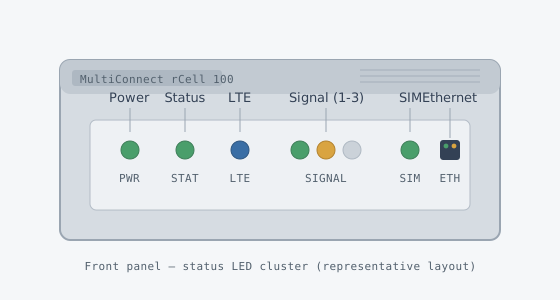
Quick colour key used in the tables below: green, amber, red, blue, off.
Power
| Color | State | Meaning |
|---|---|---|
| Green | Solid | Powered, DC input within range. Normal. |
| Amber | Solid / flicker | Input voltage low or unstable — check the supply and terminal screws. |
| Off | Off | No power. Check fuse, polarity, and that the plug is seated. |
Status
This is the "brain" LED — it reflects the firmware/OS state, not the radio.
| Color | State | Meaning |
|---|---|---|
| Amber | Blinking (fast) | Booting / initialising. Expected for the first ~40–60 s after power-on. |
| Green | Solid | System up and healthy, services running. |
| Green | Blinking (slow, ~1 Hz) | Up but performing background work (e.g. firmware apply, config reload). |
| Red | Solid / blinking | Fault — failed self-test or crashed service. Grab the logs; power-cycle if it persists. |
LTE / cellular
| Color | State | Meaning |
|---|---|---|
| Off | Off | Radio off or no SIM detected. |
| Blue | Blinking | Searching / registering on the network. |
| Blue | Solid | Registered and attached (data session up). |
| Amber | Blinking | Registered on a fallback RAT (3G/2G) rather than LTE. |
Signal (1–3 bars)
Three discrete LEDs acting as a bar meter. More lit = stronger received signal. Roughly maps to RSSI/RSRP:
| Bars lit | Indication | Approx. RSSI | Comment |
|---|---|---|---|
| 1 | Marginal | < −95 dBm | Works but expect drops. Reposition antennas. |
| 2 | Usable | −85 to −95 dBm | Fine for most IoT / low-bandwidth use. |
| 3 | Strong | > −80 dBm | What you want. Stable throughput. |
| 0 | No usable signal | — | No coverage, wrong band, or antenna problem. |
For a real number rather than bars, use AT+CSQ over SSH/serial — see verify signal. The bars round aggressively; two units on "2 bars" can be quite different.
SIM
| Color | State | Meaning |
|---|---|---|
| Green | Solid | Active SIM detected and unlocked. |
| Green | Blinking | Failover in progress / switching between SIM 1 and SIM 2. |
| Amber | Blinking | SIM present but locked (PIN required) or provisioning. |
| Red / Off | — | No SIM, seated wrong, or read error. Re-seat it (power off first). |
Ethernet
The RJ45 has the usual two integrated LEDs at the connector rather than in the front cluster:
| LED | State | Meaning |
|---|---|---|
| Link (left) | Solid | Link established. |
| Activity (right) | Blinking | Traffic passing. |
| Both off | Off | No link — check cable / far-end port. |
Normal boot sequence
For reference, a healthy cold boot looks like this:
- Power → solid green immediately.
- Status → amber blink for ~40–60 s, then solid green.
- LTE → blue blink (searching), then solid blue on attach.
- Signal → 1–3 bars settle once registered.
- SIM → solid green throughout (assuming an unlocked SIM).
If it stalls with Status blinking amber for more than a couple of minutes, it's usually a failed boot — power-cycle once, and if it repeats, check the troubleshooting notes.